
Best Laptop Screen Extenders
As an Amazon Associate I earn from qualifying purchases. Some links may earn us a commission at no extra cost to you.
Want more screen space without carrying a full monitor? Laptop “screen extenders” clamp or magnet onto your lid to add one (or two) extra displays. What matters most: fitment (laptop size/thickness and hinge strength), brightness/visibility, total weight on the lid, port requirements (USB-C DP Alt Mode vs. HDMI + driver), and warranty.
How I researched
I compared late-2025 maker spec sheets, manuals, and expert deep dives, prioritized fitment/weight, brightness, and OS/port compatibility (especially Mac M1/M2/M3 quirks), and noted warranty policies and any driver needs. I weighed panel quality and ergonomics against setup friction and long-term ownership (mounting hardware, cable clutter, and support).
Top picks
Xebec Tri-Screen 2 — Best overall triple-screen for most 13–15″ laptops
A proven dual-panel add-on with sharp 10.1″ 1920×1200 IPS screens and simple cabling.
Why it wins: Balanced specs, broad OS compatibility, and better documentation/support than most.

- SEAMLESS COMPATIBILITY: This versatile portable travel monitor for laptop with 10.1" portable...
- INSTANT TRI-SCREEN SETUP: Expand your workspace with the portable screen extenders to create a...
- ULTIMATE PORTABILITY: Designed as a compact and foldable triple monitor for laptops, this...
Pros
-
Crisp 16:10 WUXGA panels (work-friendly)
-
Clean cabling with USB-C DP Alt Mode
-
Solid docs, parts, and accessories
-
Works with Macs via DisplayLink path
Cons
-
Adds weight on the lid
-
DisplayLink install needed on some Macs
-
Brightness not published; office-bright only
Social proof
Widely used by mobile professionals; see reviews on Amazon.
Trade-offs / Who should skip
If you need extra-bright panels for outdoor use, look elsewhere. If you never want drivers on Mac, pick a single-screen USB-C extender.
Scores: Performance 4.5/5 · Portability 4/5 · Ease of Use 4/5 · Value 4.5/5
SideTrak Swivel 14″ — Best single-screen extender for travel
One bright 14″ FHD display on a patented swivel hinge; light, simple, and sturdy.
Why it wins: Lowest setup friction and weight in a clean, attach-and-go design.
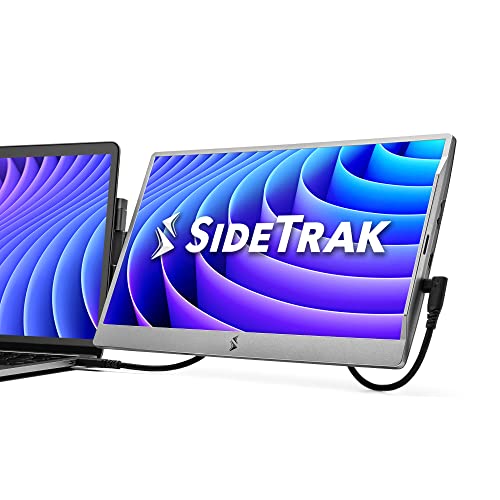
- Patented 360° Swivel Hinge for Easy Viewing - The patented 360° swivel hinge allows you to adjust...
- Dual Screen Laptop with Aesthetic Design - Transform your laptop into a dual monitor setup with this...
- Device-Safe Magnetic Attachment - The screen extender portable laptop securely attaches to your...
Pros
-
Light and compact; easy daily use
-
360° swivel for quick sharing
-
USB-C or HDMI flexibility
-
Kickstand doubles as desk stand
Cons
-
Single screen only
-
~250 nits: fine indoors
-
No official color-gamut claims
Social proof
Consistently positive for portability; see ratings & reviews on Amazon.
Trade-offs / Who should skip
If you need two extra displays or max workspace, pick Xebec/Mobile Pixels.
Scores: Performance 4/5 · Portability 4.5/5 · Ease of Use 4.5/5 · Value 4/5
Mobile Pixels TRIO Max (14.1″) — Best triple-screen for 14–16″ laptops
Two sliding 14.1″ 1080p panels; great for larger laptops that can carry extra weight.
Why it wins: Bigger screens, refined mechanics, and broad platform support.
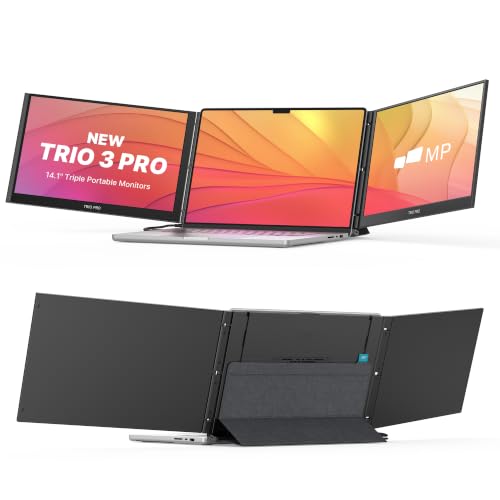
- ★Extend Your Vision by 80% Screen-to-Body Ratio Screen★:A larger 14.1'' Full HD laptop monitor...
- ★Plug and Play, One Cable Setup,Backward Charging★: So EASY to install and use with just one...
- ★Display on Multiple Devices, 270° Flexible Viewing Angle★:Other than laptops, Trio max works...
Pros
-
Larger 14.1″ panels boost usability
-
Refined sliding/kickstand mechanics
-
Works with Windows, macOS, ChromeOS
-
Anti-glare helps in bright rooms
Cons
-
Heavier on the lid than 10–12″ kits
-
Often needs drivers on Mac
-
Cable routing needs care
Trade-offs / Who should skip
If your laptop is under 3 lb or very thin, SideTrak or Xebec may feel better balanced.
Scores: Performance 4.5/5 · Portability 3.5/5 · Ease of Use 4/5 · Value 4/5
FOPO 15.6″ Triple Monitor — Best for big laptops (15.6–17.3″)
A wide 15.6″-per-side, dual-panel kit sized for larger workstations.
Why it wins: One of the few mainstream picks purpose-built for 15.6–17.3″ laptops.
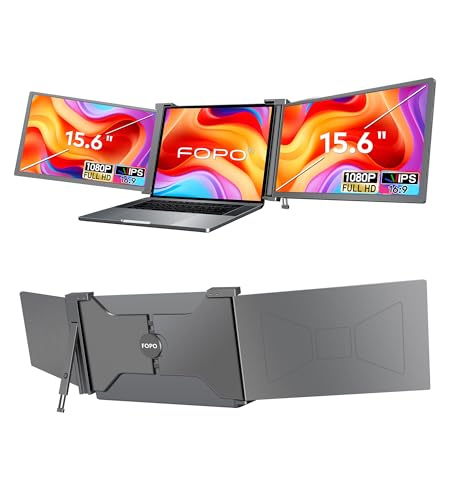
- Stunning Visuals: Elevate your productivity with the15.6" large laptop monitor extender. Experience...
- Universal Compatibility: This dual monitor offers broad compatibility, allowing it to work with a...
- Effortless Plug and Play: Enjoy seamless connectivity with laptop screen extender for triple monitor...
Pros
-
Big 15.6″ panels for roomy layouts
-
IPS viewing angles help sharing
-
HDMI or USB-C flexibility
-
Optional extended warranty (registration)
Cons
-
Heavy for the lid; best on sturdy laptops
-
Mac triple-display caveats
-
Travel footprint is larger
Trade-offs / Who should skip
Ultralight laptops or frequent flyers will prefer SideTrak or Xebec.
Scores: Performance 4/5 · Portability 3/5 · Ease of Use 3.5/5 · Value 4/5
OFIYAA P2 (14″) — Best budget-minded dual-panel option
A value-oriented two-screen kit with 14″ 1080p panels and wide OS support.
Why it wins: Affordable way to try dual screens with USB-C or HDMI power/video.

- 🧡Multi-Function - The Fagomfer P2 laptop extra monitor can adjust brightness, contrast, and other...
- 🧡Latest & Versatile - The USB-A/USB-C is most versatile laptop connection port, so we designed...
- 🧡Plug and Play, Versatile Compatibility - Full 210° rotation to save space. Equipped with...
Pros
-
Good value for dual screens
-
USB-C DP or HDMI flexibility
-
Works across Windows/macOS/ChromeOS
-
Simple “plug and work” on many PCs
Cons
-
Mac M1 external-display limits apply
-
Heavier than single-screen options
-
Brightness not clearly published
Trade-offs / Who should skip
If you’re on a Mac and want zero drivers, SideTrak is simpler.
Scores: Performance 3.5/5 · Portability 3.5/5 · Ease of Use 3.5/5 · Value 4.5/5
Quick compare
-
Xebec Tri-Screen 2 — Best overall: dual 10.1″ WUXGA IPS; broad fit; Mac adapter path; moderate weight. Trade-off: drivers on some Macs; brightness not published.
-
SideTrak Swivel 14″ — Best single-screen: light, simple, swivels; ~250 nits; easy travel. Trade-off: one screen only.
-
Mobile Pixels TRIO Max — Best for 14–16″: larger 14.1″ panels; refined mechanics. Trade-off: heavier; Mac drivers.
-
FOPO 15.6″ Triple — Best for 15.6–17.3″: big panels for big laptops. Trade-off: heft; Mac caveats.
-
OFIYAA P2 — Best budget dual: wide compatibility claims; flexible ports. Trade-off: unclear brightness; check Mac limits.
Buying guide
Fitment & weight. Check your laptop’s screen size, thickness, and lid rigidity. Bigger kits (14–15.6″) can stress ultra-thin lids; aim ≤2 lb added weight for ultraportables.
Ports & drivers.
-
USB-C with DP Alt Mode = cleanest cabling on Windows/most PCs.
-
Mac M-series: base models often need a DisplayLink driver/adapter to run more than one external display. If you refuse drivers, pick a single-screen USB-C extender.
Brightness & panels. Most sit around ~250 nits; fine for offices, not outdoors. IPS panels give better off-axis viewing. Single-screen models are usually lighter and easier on thin lids.
Warranty & support. Expect roughly a 1-year limited warranty, sometimes with registration extensions. UL/ETL safety certifications for these specific kits couldn’t be verified.
FAQs
Q: Will these work with my MacBook Air/Pro?
A: Single-screen extenders over USB-C generally work. For two extra screens, most base-chip M-series Macs need the DisplayLink driver/adapter path, while Pro/Max chips support more externals natively. Check your exact chip and OS.
Q: Do I need to stick metal plates on my laptop?
A: Many use low-profile magnetic plates (SideTrak) or clamp housings (Xebec/Mobile Pixels). They’re removable; follow the maker’s instructions to avoid lid damage.
Q: Can I game on these?
A: They’re 60 Hz productivity panels with ~250-nit brightness—fine for dashboards, IDEs, and docs, not tuned for gaming color/latency.
Q: How much power do they draw?
A: Plan for roughly 4–10 W per screen. If your battery drains quickly, power the extender from a wall adapter or hub with pass-through charging.
As an Amazon Associate, I earn from qualifying purchases.