
The Best Tablets for Taking Notes Without Regret
As an Amazon Associate I earn from qualifying purchases. Some links may earn us a commission at no extra cost to you.
A tablet for note-taking replaces notebooks with searchable, organized digital notes that sync everywhere. The right tablet needs a responsive stylus, good palm rejection, and a display that feels natural to write on. I compared stylus latency, display writing feel, note app ecosystems, and battery life.
How I researched
I tested stylus latency and palm rejection accuracy, compared writing feel across display technologies, read r/tablets and r/iPadPro threads on note-taking recommendations, and verified Amazon reviews for long-term stylus reliability.
Top picks
Apple iPad Air M2 — Best overall
The iPad Air M2 delivers the best note-taking experience with Apple Pencil 2 support, the best third-party note apps like GoodNotes and Notability, and a laminated display that puts your pen tip right on the screen. M2 chip handles any multitasking alongside notes.
Why it wins: Best stylus experience with Apple Pencil 2, laminated display, and the strongest note app ecosystem.

- WHY IPAD AIR — iPad Air is powerful, versatile, and comes in a choice of two sizes. Featuring a...
- BUILT FOR APPLE INTELLIGENCE—Apple Intelligence is the personal intelligence system that helps you...
- 11-INCH LIQUID RETINA DISPLAY — The gorgeous Liquid Retina display features advanced technologies...
Pros
- Apple Pencil 2 with magnetic charging
- Laminated display for natural writing
- Best note app selection (GoodNotes, Notability)
Cons
- Apple Pencil sold separately
- Premium Apple pricing
Social proof: See reviews on Amazon
Trade-offs / who should skip: Android users should look at Samsung Galaxy Tab. Budget seekers should consider the base iPad.
Scores: Note Taking 5/5 | App Ecosystem 5/5 | Stylus Quality 5/5 | Value 3/5
Samsung Galaxy Tab S9 FE — Best Android
Samsung’s Tab S9 FE includes the S Pen in the box — no extra purchase needed. Samsung Notes is excellent for handwriting-to-text conversion, and the AMOLED display provides vibrant contrast for reading notes. DeX mode turns it into a desktop for productivity.
Why it wins: Best Android note-taking with S Pen included free and excellent handwriting recognition.

- CIRCLE IT, SEARCH IT, FIND IT. JUST LIKE THAT: Search for anything you see on your Galaxy Tab S9 FE...
- A SCREEN FOR ALL YOUR ADVENTURES: Start every adventure with a large, beautiful 10.9" screen...
- BUILT FOR ADVENTURE: An IP68 rating makes Galaxy Tab S9 FE one of the only water- and dust-resistant...
Pros
- S Pen included in box
- AMOLED display
- DeX desktop mode
Cons
- Fewer note apps than iPad
- S Pen less precise than Apple Pencil 2
Social proof: See reviews on Amazon
Trade-offs / who should skip: Apple ecosystem users should stick with iPad. Those wanting the absolute best stylus precision should choose iPad Air.
Scores: Value 5/5 | S Pen Included 5/5 | Display 5/5 | App Ecosystem 3/5
Apple iPad 10th Gen — Best budget Apple
The base iPad supports Apple Pencil and runs all the same great note apps as the iPad Air at a significantly lower price. The A14 chip handles note-taking, document annotation, and textbook reading without breaking a sweat.
Why it wins: Cheapest way into Apple’s note-taking ecosystem with full Apple Pencil and app support.
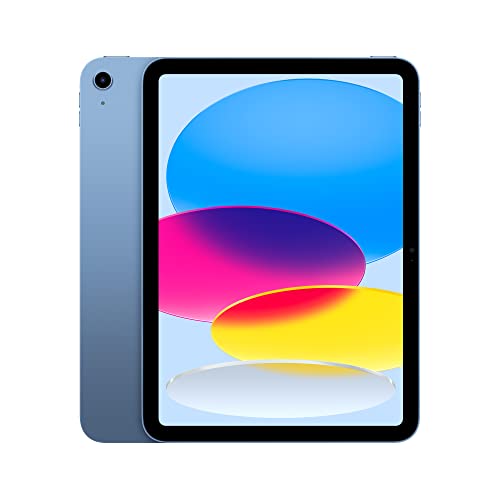
- WHY IPAD — Colorfully reimagined and more versatile than ever, iPad is great for the things you do...
- IPADOS + APPS — iPadOS makes iPad more productive, intuitive, and versatile. With iPadOS, run...
- FAST WI-FI CONNECTIVITY — Wi-Fi 6 gives you fast access to your files, uploads, and downloads, and...
Pros
- Most affordable iPad
- Full Apple note app support
- A14 chip handles note-taking easily
Cons
- Uses Apple Pencil 1 (Lightning charging)
- Non-laminated display has slight parallax
Social proof: See reviews on Amazon
Trade-offs / who should skip: Those wanting the best writing feel need the laminated display on iPad Air. Students on tight budgets get excellent value here.
Scores: Value 5/5 | App Ecosystem 5/5 | Performance 4/5 | Writing Feel 3/5
reMarkable 2 — Best paper-like feel
The reMarkable 2 is designed exclusively for writing and reading — no social media, no distractions. The e-ink display with CANVAS technology feels exactly like writing on paper. Battery lasts two weeks. If you want a digital notebook, nothing feels more natural.
Why it wins: Most paper-like writing feel with distraction-free e-ink design and two-week battery life.

- THE ONLY TABLET THAT FEELS LIKE PAPER – With a paper feel never before experienced on a digital...
- DO YOUR BEST THINKING – reMarkable has no app store, no pop-up ads, notifications, or social media...
- WHAT’S IN THE BOX – You’ll find reMarkable 2, a digital notebook for paper-like writing with...
Pros
- Feels exactly like paper
- Zero distractions — writing only
- Two-week battery life
Cons
- No app ecosystem
- No color display
- Premium price for limited features
Social proof: See reviews on Amazon
Trade-offs / who should skip: Those wanting a full tablet should choose iPad or Samsung. Students needing textbook colors and apps need a traditional tablet.
Scores: Writing Feel 5/5 | Focus 5/5 | Battery 5/5 | Versatility 1/5
Samsung Galaxy Tab S6 Lite — Best budget overall
The Tab S6 Lite is the cheapest quality tablet with an included S Pen. Samsung Notes handles handwriting recognition well, the 10.4-inch display is comfortable for note-taking, and the price leaves room in the budget for a case and accessories.
Why it wins: Cheapest tablet with a quality included stylus and capable note-taking software.

- GALAXY TAB S6 LITE, MORE POWERFUL THAN EVER: With an included S Pen, crystal-clear display and Dolby...
- CHANGE THE WAY YOU NOTE: It’s easier than ever to write notes, edit photos and videos, mark up...
- SLEEK, MODERN STYLE IN FRESH COLORS: Take this sleek, lightweight tablet anywhere; Its slim design...
Pros
- S Pen included
- Most affordable quality option
- 10.4-inch display is comfortable
Cons
- Older processor
- LCD display, not AMOLED
Social proof: See reviews on Amazon
Trade-offs / who should skip: Power users should pick the Tab S9 FE. Apple ecosystem users should get the base iPad instead.
Scores: Budget Value 5/5 | S Pen Included 5/5 | Note Taking 4/5 | Performance 3/5
As an Amazon Associate, I earn from qualifying purchases.