
Top ThinkPads for Work, School, and Travel
As an Amazon Associate, I earn from qualifying purchases. Some links may earn us a commission at no extra cost to you.
ThinkPads are easiest to choose by typing + durability (primary metric): keyboard comfort, chassis toughness, and long-term reliability. After that, screen size and portability decide which series fits best.
Top picks
ThinkPad X1 Carbon Gen 13 — Best overall premium ThinkPad
A top pick for daily carry: light, premium, and built around the classic ThinkPad typing experience.
Why it wins: best blend of typing + durability (primary metric) and portability.

- The ThinkPad X1 Carbon Gen 13 Aura Edition weighs less than a kilogram, so you can manage it with...
Pros
-
Excellent keyboard for heavy typing
-
Premium build in a very light chassis
-
Great for travel and daily commuting
Cons
-
Typically expensive vs T-series
-
Limited for gaming workloads
Trade-offs / who should skip
-
For better value and more “workhorse” practicality, T14 Gen 6 is usually the smarter buy.
Scores: Performance 5/5 • Typing + durability 5/5 • Ease of use 5/5 • Value 3/5
ThinkPad T14 Gen 6 — Best workhorse value
The “default business ThinkPad” choice: durable, practical, and often a better deal than the X1 line.
Why it wins: strong durability and daily usability without premium pricing.

- Newly Released ThinkPad T14 Gen 6 with MIL-STD 810H Military Grade certification, equipped with...
- 14" FHD+ (1920 x 1200) IPS Anti-glare Non-Touch Display delivers sharp visuals and wide viewing...
- 2 x USB-A 3.2 Gen 1 (1 Always On), 2 x Thunderbolt 4, HDMI, Ethernet (RJ-45), Headphone/Microphone...
Pros
-
Great all-around productivity performance
-
Practical ports and everyday usability
-
Strong long-term daily-driver potential
Cons
-
Heavier than X1 Carbon
-
Screen options vary a lot by listing
Trade-offs / who should skip
-
If the laptop is carried everywhere, X1 Carbon’s weight savings can be worth it.
Scores: Performance 4/5 • Typing + durability 5/5 • Ease of use 4/5 • Value 5/5
ThinkPad T16 Gen 4 — Best big-screen productivity
Best for spreadsheets, multitasking, and anyone who wants more screen space without losing ThinkPad durability.
Why it wins: a bigger screen plus a great keyboard for long sessions.
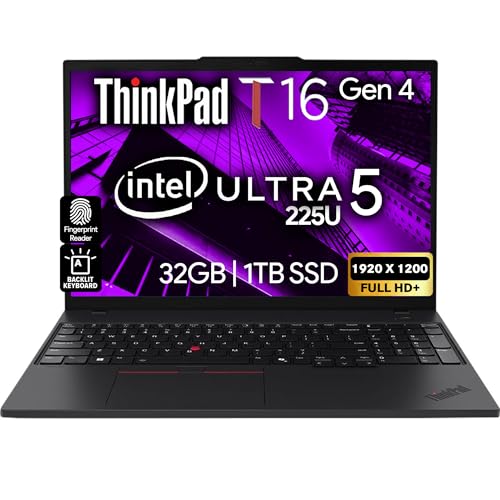
- POWERFUL PERFORMANCE: The Lenovo ThinkPad T16 Gen 4 features the Intel Ultra 5-225U processor with...
- IMMERSIVE DISPLAY: Enjoy an immersive viewing experience with the Lenovo ThinkPad T16 16-inch WUXGA...
- KEYBOARD & CONNECTIVITY: The ThinkPad T16 features spill-resistant, backlit keyboard for comfortable...
Pros
-
Large display for multitasking
-
Great keyboard for long work sessions
-
Strong “desk replacement” feel
Cons
-
Less portable than 14-inch models
-
Needs more bag and desk space
Trade-offs / who should skip
-
Frequent travelers should prioritize a 14-inch ThinkPad.
Scores: Performance 4/5 • Typing + durability 5/5 • Ease of use 4/5 • Value 4/5
ThinkPad X1 Yoga Gen 10 — Best 2-in-1 ThinkPad
A premium convertible for note-taking, presentations, and flexible work modes.
Why it wins: ThinkPad build + 2-in-1 versatility.

- Processor: Intel Core Ultra 7 258V Processor (LPE-cores up to 3.70 GHz P-cores up to 4.80 GHz...
- NPU: Intel AI Boost integrated in Intel Core Ultra processor; Graphic Card: Integrated Intel Arc...
- Memory: 32 GB LPDDR5X-8533MT/s (Memory on Package); Storage: 2 TB SSD M.2 2280 PCIe 4.0x...
Pros
-
2-in-1 flexibility for notes and meetings
-
Premium build quality
-
Strong keyboard for a convertible
Cons
-
Pricier than clamshell models
-
Slightly heavier than non-touch options
Trade-offs / who should skip
-
If tablet mode won’t be used, X1 Carbon or T14 is usually a better value.
Scores: Performance 4/5 • Typing + durability 4/5 • Ease of use 5/5 • Value 3/5
ThinkPad E14 Gen 7 — Best budget ThinkPad (latest gen)
A good choice when cost matters but a ThinkPad-style keyboard and business-leaning build are still wanted.
Why it wins: most affordable path into a newer-gen ThinkPad.

- Unopened retail packaging, sold as configured by Lenovo. One Year Onsite Lenovo Warranty. Add up to...
- The ThinkPad E14 Gen 7 is a unique blend of a 14" touchscreen display, robust Intel Core 7 240H...
- The ThinkPad delivers unparalleled reliability and efficiency for professionals, with a robust 1 TB...
Pros
-
Best entry point into the latest E-series generation
-
Solid for school and everyday productivity
-
ThinkPad feel at a lower tier
Cons
-
Not as premium as T/X1
-
Configs vary a lot—specs must be checked carefully
Trade-offs / who should skip
-
For a long-term primary work laptop, the T14 line is often the safer bet.
Scores: Performance 3/5 • Typing + durability 4/5 • Ease of use 4/5 • Value 5/5
Quick compare (table-free)
-
Best premium: X1 Carbon Gen 13 — B0DQ4CRXDQ
-
Best value workhorse: T14 Gen 6 — B0DN7THML6
-
Best big screen: T16 Gen 4 — B0F84Y8JFK
-
Best 2-in-1: X1 Yoga Gen 10 — B0FJ9WTZ3N
-
Best budget latest-gen: E14 Gen 7 — B0FPRGPZQP
Buying guide
1) Choose the right ThinkPad series
-
X1 Carbon: premium + lightest carry for commuting/travel
-
T14/T16: best “workhorse” balance of durability, ports, and value
-
X1 Yoga: best when tablet mode and flexibility matter
-
E-series: best when budget is tight
2) Minimum “don’t regret it” specs
-
16GB RAM (or a confirmed upgrade path)
-
512GB SSD (or plan to upgrade storage)
-
A screen option that matches the use (basic office vs higher-quality display)
3) Common listing traps to avoid
-
Unclear screen type/resolution (can vary a lot)
-
Older generation sold at near-new pricing
-
Very small SSDs on “business” listings
FAQs
Which ThinkPad is the best all-around pick?
For most people, T14 is the safest all-around balance of value, durability, and day-to-day usability. For maximum portability, X1 Carbon is the premium pick.
Is the X1 Carbon worth it over the T14?
It’s worth it when weight and premium build are priorities (daily carry). For most desk-focused users, T14 is better value.
Is the E-series good enough?
Yes for school and general work, especially on a budget. For heavier daily work over many years, T-series is usually the stronger long-term choice.
As an Amazon Associate, I earn from qualifying purchases.